Vibe Yes, Coding Not So Much
Paweł Krystkiewicz
February 12, 2026
State of AI as of February 2026

Programmers using AI are 19% slower while self-reporting that they are 24% faster [1]. This is not a mistake! Vibe coding is simply not a good idea. And there are several reasons why.
Capabilities, Context, and Comprehension
AI is not as capable as many believe, and it’s unclear whether it will ever be. It is not at a level of development where it can fully take over all work of the software developers and do so effectively. When it does create something, it can also introduce bugs, and with each iteration, AI essentially starts from scratch because it doesn’t truly “comprehend” anything in the way real intelligence does.
An example of this problem is something I noticed in my own vibe coded project that made me facepalm. You can see that the machine is trying to achieve the goal, but it cannot elegantly fit into the existing code. The existing code seems to hinder AI more than serve as a foundation for development.
What AI did in my code was simply keep adding more states using `useState` in React—resulting in nine separate `useState` calls instead of using a single one with an object. This is an anti-pattern that even juniors are taught to avoid.
/* Each AI pass generated extra logic
* without understanding what already existed in the code
*/
 const [locale, setLocale] = useState<Locale>('pl')
 const [html, setHtml] = useState<string>('')
 const [isRendering, setIsRendering] = useState(false)
 const [copied, setCopied] = useState(false)
const [translationValues, setTranslationValues] = useState<
 Record<string, string>
 >({})

 const [newVariableName, setNewVariableName] = useState('')
 const [isAddingVariable, setIsAddingVariable] = useState(false)
 const [variables, setVariables] = useState<string[]>([
 'subject',
 'previewText',
 ])
const [isSavingContent, setIsSavingContent] = useState(false)
Anti-patterns generated by AI—each state separately
interface TemplatePreviewPageState {
 locale: Locale
 html: string
 translationValues: Record<string, string>
 isCopied: boolean
 isRendering: boolean
 isSaving: boolean
}
//rest
const [state, setState] = useState<TemplatePreviewPageState>({
 html: '',
 locale: 'pl',
 isCopied: false,
 isRendering: false,
 isSaving: false,
 translationValues: {},
 })
State consolidated in a single object
There are several causes behind these problems.
Memory
An LLM has no memory. Every session starts from scratch. The model doesn’t remember what it wrote yesterday, doesn’t remember the architecture established with it a week ago, nor the conventions used in the project. A true tabula rasa. The only thing such a model can do is re-read all the instructions it’s been given and all configuration files, up to the point where its physically available memory (on the server) runs out.
That’s why the model keeps adding more `useState` calls instead of adapting to the existing code state. It duplicates code, violating the DRY principle, and instead of extracting it into separate files as independent, shared functions—practically begging to be covered by unit tests.
Hallucinations
Another significant problem is hallucinations. This stems from how LLMs work—every query triggers some response. The model essentially has no option to answer “I don’t know,” because hallucinations are a perfect example of feature, not a bug. It’s a direct consequence of the generative nature of the model. The same mechanism that allows the model to create sensible generalizations also enables it to produce content that appears coherent but doesn’t match reality. Without this, we wouldn’t even be talking about generating content—let alone code.
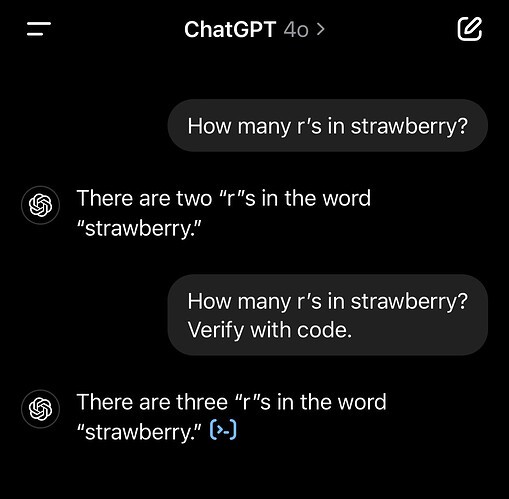
It works roughly like this: if some tokens enter the system, they get processed, and the result of that process will almost always be something—because there’s almost always something in the training data to latch onto.
Situations where a chatbot might answer `I don’t know` or refuse to respond are few. This may happen in cases of:
- internal conflict,
- insufficient confidence in the correctness of the answer,
- detection of hallucination risk,
- a topic subject to restrictions (copyright, security, privacy)
Almost always this will be the result of safeguards operating in a layer other than the model itself. Glaring examples of such behavior were visible in the early versions of ChatGPT, where it found nothing in its training data or the safety layer detected an error from the model itself:
As an AI language model with a limited knowledge cutoff, I’m unable to provide details about [SUBJECT].
I vividly remember how annoying it was.
Multi-Step Reasoning and Planning
The current architecture of AI models generates text token by token—each subsequent token being the statistically most probable continuation. For non-trivial programming tasks, planning several steps ahead is often required due to code dependencies and relationships across the entire project. Code, unfortunately, doesn’t exist in a vacuum and isn’t just a regular chat message.
An engineer can see this chain of dependencies and plan the sequence in advance. AI approaches each step independently—generating a solution for what’s immediately in front of it, without having a “mental map” of the entire plan, because it simply lacks this capability.
A band-aid for this is chain-of-thought prompting—where the model “thinks out loud”, simulating planning by generating text about planning. Unfortunately, this is not actual planning in some internal representation.
Architectural Consistency
This is one of the bigger pain points for developers and what I mentioned in the example. AI cannot adhere to architectural principles and project conventions because it simply doesn’t understand them. No process resembling human reasoning occurs within it, so naturally it can’t.
This is precisely what happened in the multiple `useState` example—the model doesn’t break any syntax rules of JavaScript, TypeScript, or React. The code works, but it breaks conventions that exist for specific reasons, and the model cannot grasp those reasons because that requires understanding why, not just knowing what follows what and when.
For exactly this reason, a vibe-code application is not suitable for a proper product life cycle, which involves running for years while being developed, fixed, and maintained.
Rare Technologies = Poor Results
Another factor worth mentioning is that AI productivity drops drastically with project size and technology rarity. AI has a lot of training data—the more popular the technology, the larger its share in that data.
React with popular libraries? Great, we have plenty of that! Languages like Lua, Rust, and OCaml appear far less frequently in training data. You can mitigate this by feeding AI the documentation, but again—that's just a band-aid on a bigger problem.
Bad Code, but Code
Let’s assume you managed to create an application using AI that works as expected. What's next? Coding solely with AI carries enormous risk, because simply generating code—even good code—isn't enough.
We constantly hear about cases where someone launched a fantastic LLM-generated application. They did it very quickly and without experience, advertising it on Twitter as their success story and collecting a ton of likes. Reality quickly catches up with them. It often turns out that the application had no security measures, and all its access keys and customer data were already making a second leap around the internet because they weren’t properly secured.
A few examples:
- Tea App (July 2025)—Leak of 72,000 photos, including 13,000 ID card photos from user verification. The cause was leaving a Firebase database with default settings—no security. [2]
- EnrichLead (March 2025) — A SaaS built 100% by Cursor, zero hand-written code. Two days after a viral post bragging about this fact: ”guys, I’m under attack.” API keys in the frontend, no authentication, open database. The author: ”as you know, I’m not technical”. A week later, the app was shut down [3].
- Moltbook (January 2026)—the most recent case—a platform for AI agents. 3 days after launch, 1.5 million API keys, 150,000 API tokens, and email addresses leaked [4].
Other issues with AI-generated output:
- 45% of AI-generated code contains security vulnerabilities. [5]
- 1 in 5 CISOs reported a serious incident caused by AI code. [6]
- OpenAI API keys—leak volume increased 1212x year-over-year in 2023. [7]
In these cases, AI-generated working code, sure! But there was no one in the process to think about security or capable of implementing it. This clearly shows that applications and software as a product are more than just working code.
The Mythical Productivity
As we can see, LLMs today are unable to generate complete solutions from start to finish, let alone replace software engineers. They are therefore relegated to the role of yet another tool. But does it actually speed up work? The latest data suggests we’ve fallen into a trap of subjective productivity perception.
A study conducted on a group of experienced open-source programmers reveals a shocking paradox: developers using AI were objectively **19% slower** at solving complex problems than those working without such support. Surprisingly, the subjects felt they were **24% more productive**. Even after the study, they maintained that their productivity was 20% higher [1]. This may suggest that we confuse the speed of AI-generated code (letters appearing on screen like in The Matrix) with the speed of actual problem-solving.
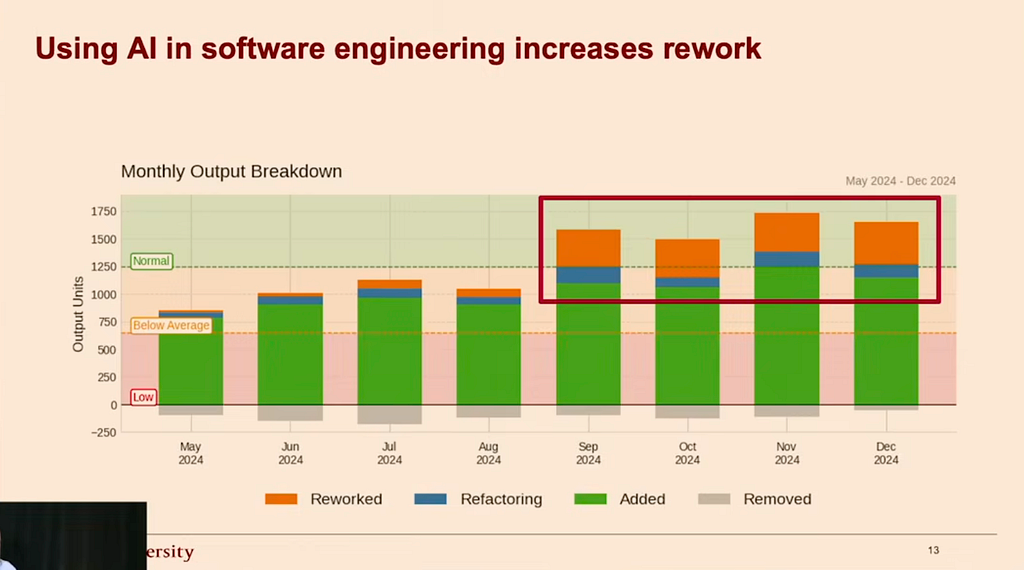
These results correlate with an extensive study by Stanford researchers [8]. It confirms that AI’s impact on work is strongly context-dependent. The greatest gains (in the range of 30–40%) were observed in low-complexity tasks and in greenfield projects, where code is built “from scratch.” The situation changes drastically in brownfield projects. There, due to the need to analyze existing dependencies, the benefits from using AI drop dramatically, and for highly complex tasks, the probability that AI will actually hinder work and introduce the need for time-consuming fixes and refactors becomes very high.
That’s experienced developers—what about juniors? Anthropic published a study in January 2026 that answers this question [9]. In a randomized experiment with 52 programmers (mostly juniors) learning a new Python library:
- The group using AI scored 17% lower on the test
- The AI boost in the task itself was statistically insignificant
Participants spent up to 30% of their time preparing prompts for AI. The resulting code was rather mindlessly pasted into their programs.
I need to pause here, because honestly, this mindless pasting of AI-generated code is no different from how StackOverflow was used before the LLM era. When devs got stuck with a problem, it was the first place they (we) ran to search for help (because that’s what Google told them to do), and they copied solutions at random. Sometimes taking code from—Lord have mercy—the problem description (i.e., the buggy code), rather than from the highest-rated answer. If such was even available.
The difference seems to lie in scale and barrier to entry. SO required basic searching skills. As for selection—as I already mentioned—not necessarily. AI delivers solutions directly to the code editor, eliminating the last elements of friction. I’m starting to suspect that the problem isn’t just LLMs, but people’s tendency to minimize the effort put into work—which some may call laziness.
Approach Matters
The Anthropic study also identified user behavior patterns that help with learning, as well as those that actively prevent it.
Poor results (<40% on the test) came from programmers with these approaches:
- AI delegation—full delegation, fastest to complete, but nothing retained
- Progressive AI reliance—started on their own, then delegated everything to AI
- Iterative AI debugging—used AI for debugging instead of understanding the problem
Patterns leading to good results (>65% on the test):
- Generation-then-comprehension—generated code, then asked, “Why does this work?”
- Hybrid code explanation—asked for code and explanation at the same time
- Conceptual inquiry—asked about concepts, coded on their own (the fastest approach to learning)
One sentence from the study beautifully sums this up:
Cognitive effort — and even the painful experience of getting stuck — is likely important for building proficiency.
Why Does This Happen?
We have over 70 years of quality management research showing that eliminating sources of errors is far more effective than fixing errors during the process. It’s not worth accelerating the coding process if it slows down the debugging process. You can waste far more time debugging bad code than overcoming writer’s block.
Brian Kernighan wrote in The Elements of Programming Style:
Everyone knows that debugging is twice as hard as writing a program in the first place. So if you’re as clever as you can be when you write it, how will you ever debug it?
And this is precisely what the Anthropic study demonstrated. A junior with AI as a crutch is unable to debug the code produced this way.
What Works?
Imagine if you had to spend half a day writing a config file before your linter worked properly. Sounds absurd, yet that’s the standard workflow for using LLMs. Feels like no one has figured out how to best use them for creating software, because I don’t think the answer is mass code generation. [10]
AI in its current form has certain areas where it can genuinely be effective—where the context is static and limited.
Creating Documentation
Documentation has always been problematic. One reason is that code is seldom a finished work, but a living creation that changes over time. Documentation would have to keep up with it or be generated automatically.
The second problem stems from the first—developers can be effectively discouraged by the Sisyphean nature of this work. It’s also worth noting that they don’t necessarily have to be good at both writing in programming as well as a natural language. If essays in school weren’t their thing, then writing a dissertation after every quite tiresome. Moreover, good documentation can take more time than the code itself (within the same task, code + documentation). Hence gems like
“good code documents itself”
The problem with this statement is that code documents itself only for people who deeply understand such code, and even then not always. The fact that I understand a line I’m looking at doesn’t mean I understand its consequences three modules down the line and its impact on every scenario in the business process being implemented.
In tools like Claude Code, you can add commands, and one of them can be `/docs`, after which the agent checks what’s in the documentation versus what’s currently in the code. Invoking such a command can be configured as a pre-commit hook—meaning it runs before committing changes to the project. This effectively prevents adding changes to the project without documentation.
Code Review
As we’ve established, people are lazy. And talented people are extra lazy. That’s why we have so many automations. Anyway, we work hard for that reputation.
Static code analysis is developers’ least favorite activity, right after meetings and tech support. No wonder they do it at the lowest possible cost.
As a result, we see phenomena like a single comment under a 2,000-line code change—“LGTM”—and approval of changes without particularly delving into their content or meaning. Sometimes someone actually starts reviewing code and catches a few things. However, it often relates to their favorite style and writing mannerisms.
Proper quality control at this stage requires a lot of time and energy. In reality, it's as much a regular task, yet it’s treated as something done on the fly. You need to analyze the business context, read the task description, and understand the expected outcome. This quality of review is very rare. Chef's kiss if you actually check out the branch on your machine and run it to smoke test the changes made on it.
AI tools for code review don’t have such limitations and problems—when built according to given instructions, they can be far more thorough with low effort. Often looking where a programmer wouldn’t pay attention.
Importantly, a machine doesn’t get tired and won’t be bored by having to review code changes for the fifth time on the same day. It starts up, checks, and writes new comments. The rest is a matter of adjusting the configuration.
In no way am I claiming this is a solution for all the ailments of this process, nor that you can eliminate the human element entirely, especially since I’m an advocate for the human-in-the-loop approach. It’s simply an additional stage of verification for introduced changes. With highly engaged developers, you’ll notice they correct AI’s erroneous conclusions and assertions if their changes are intentional and leverage mechanisms that the automated tool didn’t catch. And that does happen!
Feedback and What’s Next?
Within the same process, you can add another building block—a command that checks code comments and remarks from code review, e.g., on GitHub PRs. From both real and artificial intelligence. Then a summary and assessment of the significance of the comments, and finally their implementation. Since code review changes are usually minor in scope, we can assume operating within a limited context, and LLMs handle this very well.
Content
Another application is all kinds of content displayed to users in the application. Need something quickly for a prototype? AI can handle it. Marketing emails, welcome emails, waitlist notifications, subscription emails—here we have a quick-fix solution. The ease and accuracy of generating this type of content stem from the marketing largely operating in the public space, and inevitably this content made its way into training data in copious amounts.
Beyond user-facing text, we can also automate the creation of PR descriptions. The moment of creating them is often the moment when you no longer have the mental bandwidth for crafting an elaborate description of the changes made. “Why bother with a description? It’s obvious—that's what the code is for.” Terribly close to self-documenting code, isn’t it? The task of creating a comprehensive and well-structured description can safely be delegated to the machine—it's just a description that humans will read. The only risk is that the description might sound artificial, overly pedantic, and will contain an unhealthy number of emojis.
PRD and Business Analysis
Yet another valuable application of AI is business analysis for validating your ideas and grounding them in reality. When we have an idea, the very first validation can happen through an LLM very quickly. These machines are good at creating a first draft of what should be in the application and what features need to be considered. Such a document is a good starting point—from there you can expand the description, assumptions, and requirements. It can then be used for further iterations and brainstorming in the chat.
Once we have such a document, we can task the machine with creating a PRD (Product Requirements Document) simply as a prompt. And from there, it’s just a step to user stories and concrete tasks to bring the idea to life as an app.
And again—if it’s an entirely new creation in a popular technology, an AI agent will manage to implement at least a prototype of such a document.
Conclusion
LLMs are not suited for writing good, secure, and maintainable applications without supervision. In short, they work everywhere the context is limited and the task is well-defined. Where you need to understand and develop existing code, they simply lack the memory, let alone the comprehension. An LLM might not count the letters in `strawberry`, but it will certainly generate a payment system. What could go wrong?
Let’s be honest—the number of lines of code/commits per day is not a good measure of productivity. Unfortunately, some of you aren’t ready for that conversation yet.
- Becker, J., Rush, N., Barnes, E., & Rein, D. (2025). Measuring the Impact of Early-2025 AI on Experienced Open-Source Developer Productivity. arXiv:2507.09089. https://metr.org/blog/2025-07-10-early-2025-ai-experienced-os-dev-study/
- Tea App data breach (July 2025). Netlas Security Research. https://netlas.io/blog/vibe-coding-security-risks/
- @leojrr. (2025, March). EnrichLead incident thread. X/Twitter. https://x.com/leojrr/status/1900767509621674109
- Moltbook exposes user data and API keys. (2026, January). Infosecurity Magazine. https://www.infosecurity-magazine.com/news/moltbook-exposes-user-data-api/
- Veracode. 2025 GenAI Code Security Report. https://www.veracode.com/resources/analyst-reports/2025-genai-code-security-report/
- Aikido Security. State of AI in Security & Development 2026. https://www.aikido.dev/state-of-ai-security-development-2026
- GitGuardian. (2024). State of Secrets Sprawl 2024. https://www.bleepingcomputer.com/news/security/over-12-million-auth-secrets-and-keys-leaked-on-github-in-2023/
- Evil Martians. (2025). Does AI Actually Boost Developer Productivity?https://www.youtube.com/watch?v=tbDDYKRFjhk
- Shen, J. H. & Tamkin, A. (2026). How AI Impacts Skill Formation. arXiv:2601.20245. https://www.anthropic.com/research/AI-assistance-coding-skills
- 10. r/ExperiencedDevs. Study discussion: Experienced devs think they are 24% faster with AI, but are actually 19% slower. Reddit. https://www.reddit.com/r/ExperiencedDevs/comments/1lwk503/study_experienced_devs_think_they_are_24_faster